
Email Notifications & Processing
We support both event-based email notifications and document upload over email.
## Email Notifications
We support email notifications for document processing.
You can configure email notifications for the following events:
- Document Processing
- CDBalancer
- Copilot Tasks (coming soon)
Example Usage
Section titled “Example Usage”# TODO: add this// TODO: add this// TODO: add thisEmail Processing
Section titled “Email Processing”We support processing over email. You can send a PDF to our designated email address via attachments and we will process it as if you uploaded it via the API.
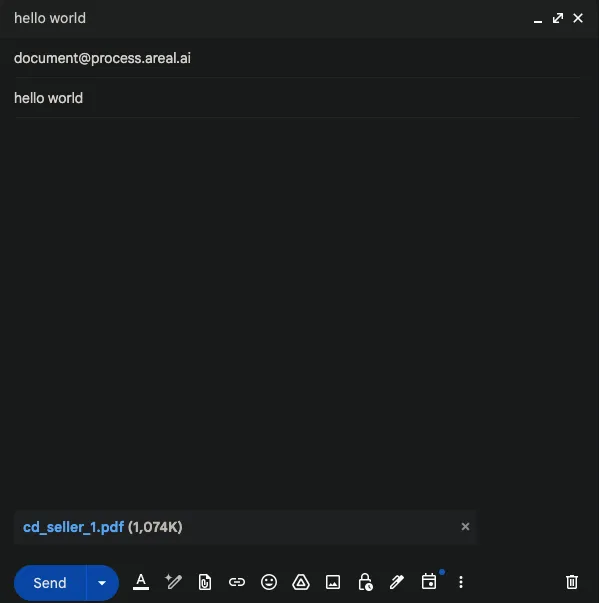
Example Usage
Section titled “Example Usage”import smtplibimport sslfrom email import encodersfrom email.mime.base import MIMEBasefrom email.mime.multipart import MIMEMultipartfrom email.mime.text import MIMETextfrom pathlib import Pathfrom typing import List, Optional
def send_email( receiver_email: str, subject: str, body: str, attachment_paths: Optional[List[str]] = None, sender_email: str = "your_email@example.com", smtp_server: str = "smtp.gmail.com", smtp_port: int = 587, password: str = "your_app_password",) -> bool: try: # Create the email message message = MIMEMultipart() message["From"] = sender_email message["To"] = receiver_email message["Subject"] = subject
# Add body to email message.attach(MIMEText(body, "plain"))
# Process attachments if any if attachment_paths: for attachment_path in attachment_paths: try: with open(attachment_path, "rb") as attachment: # Create the attachment part part = MIMEBase("application", "octet-stream") part.set_payload(attachment.read())
# Encode the attachment encoders.encode_base64(part)
# Add header to attachment filename = Path(attachment_path).name part.add_header( "Content-Disposition", f"attachment; filename= {filename}" )
# Add attachment to message message.attach(part) except Exception as e: print(f"Error processing attachment {attachment_path}: {str(e)}") continue
# Create secure SSL/TLS context context = ssl.create_default_context()
# Connect to the SMTP server and send email with smtplib.SMTP(smtp_server, smtp_port) as server: server.starttls(context=context) server.login(sender_email, password) server.send_message(message)
return True
except Exception as e: print(f"Error sending email: {str(e)}") return Falseusing System;using System.Collections.Generic;using System.Net;using System.Net.Mail;using System.Net.Mime;using System.IO;using System.Linq;
public class ProcessingOverEmail{ public static bool SendEmail( string receiverEmail, string subject, string body, List<string> attachmentPaths = null, string senderEmail = "your_email@example.com", string smtpServer = "smtp.gmail.com", int smtpPort = 587, string password = "your_app_password" ) { try { // Create the email message using (var message = new MailMessage()) { message.From = new MailAddress(senderEmail); message.To.Add(new MailAddress(receiverEmail)); message.Subject = subject; message.Body = body; message.IsBodyHtml = false;
// Process attachments if any if (attachmentPaths != null) { foreach (var attachmentPath in attachmentPaths) { try { var attachment = new Attachment(attachmentPath, MediaTypeNames.Application.Octet); var disposition = attachment.ContentDisposition; disposition.FileName = Path.GetFileName(attachmentPath); message.Attachments.Add(attachment); } catch (Exception e) { Console.WriteLine($"Error processing attachment {attachmentPath}: {e.Message}"); continue; } } }
// Create SMTP client and send email using (var client = new SmtpClient(smtpServer, smtpPort)) { client.EnableSsl = true; client.Credentials = new NetworkCredential(senderEmail, password); client.Send(message); } }
return true; } catch (Exception e) { Console.WriteLine($"Error sending email: {e.Message}"); return false; } }}import java.util.*;import java.util.Properties;import javax.mail.*;import javax.mail.internet.*;import java.io.File;import java.io.FileInputStream;import java.io.IOException;
public class ProcessingOverEmail { public static boolean sendEmail( String receiverEmail, String subject, String body, List<String> attachmentPaths, String senderEmail, String smtpServer, int smtpPort, String password ) { try { // Create the email message Properties properties = new Properties(); properties.put("mail.smtp.host", smtpServer); properties.put("mail.smtp.port", String.valueOf(smtpPort)); properties.put("mail.smtp.auth", "true"); properties.put("mail.smtp.starttls.enable", "true");
Session session = Session.getInstance(properties, new Authenticator() { @Override protected PasswordAuthentication getPasswordAuthentication() { return new PasswordAuthentication(senderEmail, password); } });
Message message = new MimeMessage(session); message.setFrom(new InternetAddress(senderEmail)); message.setRecipient(Message.RecipientType.TO, new InternetAddress(receiverEmail)); message.setSubject(subject);
// Create multipart message Multipart multipart = new MimeMultipart();
// Add body to email MimeBodyPart textPart = new MimeBodyPart(); textPart.setText(body); multipart.addBodyPart(textPart);
// Process attachments if any if (attachmentPaths != null) { for (String attachmentPath : attachmentPaths) { try { MimeBodyPart attachmentPart = new MimeBodyPart(); File file = new File(attachmentPath); attachmentPart.attachFile(file); multipart.addBodyPart(attachmentPart); } catch (IOException e) { System.out.println("Error processing attachment " + attachmentPath + ": " + e.getMessage()); continue; } } }
message.setContent(multipart);
// Send email Transport.send(message);
return true; } catch (MessagingException e) { System.out.println("Error sending email: " + e.getMessage()); return false; } }
public static void main(String[] args) { List<String> attachments = Arrays.asList("sample.pdf"); sendEmail( "receiver@example.com", "Subject", "Body", attachments, "your_email@example.com", "smtp.gmail.com", 587, "your_app_password" ); }}